How to Migrate Users Between Sites in WordPress Multisite (One-Time Task)
In WordPress Multisite, users are global.
They live in the commonwp_userstable and are not copied per site.
What is site-specific is a user’s role and access to each blog.
So if your cloned site appears to be “missing users,” they usually already exist—you just need to assign them to the new site.
This post explains how to do that safely as a one-time migration.
What This Solution Does
- Attaches all users from Site A to Site B
- Preserves each user’s role wherever possible
- Runs only once
- Designed specifically for WordPress Multisite
- No database exports or imports needed
Step 1: Create a MU Plugin
- Go to your WordPress installation:
wp-content/ - Create a folder called:
mu-plugins or plugins - inside
mu-plugins, create a file:
clone-users-from-site-a-to-b.php
Step 2: Add This Code
<?php
/**
 * Plugin Name: Multisite User Migrator
 * Description: One-time (or repeated) user migration between sites in a WordPress Multisite network via Network Admin UI.
 * Author: Vinay Vengala
 * Version: 1.0
 * Network: true
 */

if ( ! defined( 'ABSPATH' ) ) {
    exit;
}

class MS_User_Migrator {

    public function __construct() {
        // Only load in multisite & for network
        if ( is_multisite() ) {
            add_action( 'network_admin_menu', array( $this, 'add_network_page' ) );
        }
    }

    /**
     * Add a page under Network Admin -> Users (or Settings).
     */
    public function add_network_page() {
        add_menu_page(
            __( 'User Migrator', 'ms-user-migrator' ),
            __( 'User Migrator', 'ms-user-migrator' ),
            'manage_network_users',
            'ms-user-migrator',
            array( $this, 'render_page' )
        );
    }

    /**
     * Render options panel + handle form submission.
     */
    public function render_page() {
        if ( ! current_user_can( 'manage_network_users' ) ) {
            wp_die( __( 'You do not have permission to access this page.', 'ms-user-migrator' ) );
        }

        $message = '';
        $error   = '';

        // Handle form submit
        if ( isset( $_POST['msum_submit'] ) ) {
            check_admin_referer( 'msum_migrate_users', 'msum_nonce' );

            $from_blog_id  = isset( $_POST['from_blog_id'] ) ? absint( $_POST['from_blog_id'] ) : 0;
            $to_blog_id    = isset( $_POST['to_blog_id'] ) ? absint( $_POST['to_blog_id'] ) : 0;
            $fallback_role = isset( $_POST['fallback_role'] ) ? sanitize_text_field( $_POST['fallback_role'] ) : 'subscriber';

            if ( ! $from_blog_id || ! $to_blog_id ) {
                $error = 'Both "From Site ID" and "To Site ID" are required.';
            } elseif ( $from_blog_id === $to_blog_id ) {
                $error = 'Source and target site IDs must be different.';
            } else {
                list( $migrated_count, $skipped_count, $err_msg ) = $this->migrate_users( $from_blog_id, $to_blog_id, $fallback_role );

                if ( $err_msg ) {
                    $error = $err_msg;
                } else {
                    $message = sprintf(
                        'Migration complete. Users added to target site: %d. Users already had access and were skipped: %d.',
                        $migrated_count,
                        $skipped_count
                    );
                }
            }
        }

        // Get last used values (to keep form filled after submit)
        $from_blog_val  = isset( $_POST['from_blog_id'] ) ? absint( $_POST['from_blog_id'] ) : '';
        $to_blog_val    = isset( $_POST['to_blog_id'] ) ? absint( $_POST['to_blog_id'] ) : '';
        $fallback_val   = isset( $_POST['fallback_role'] ) ? sanitize_text_field( $_POST['fallback_role'] ) : 'subscriber';

        ?>
        <div class="wrap">
            <h1><?php esc_html_e( 'Multisite User Migrator', 'ms-user-migrator' ); ?></h1>

            <p>Use this tool to assign users from one site (blog) in the network to another. Users already exist globally; this just attaches them to the target site with a role.</p>
            <p><strong>Note:</strong> This action cannot be easily undone. Always test on staging first.</p>

            <?php if ( $message ) : ?>
                <div id="message" class="updated notice is-dismissible"><p><?php echo esc_html( $message ); ?></p></div>
            <?php endif; ?>

            <?php if ( $error ) : ?>
                <div class="error notice is-dismissible"><p><?php echo esc_html( $error ); ?></p></div>
            <?php endif; ?>

            <form method="post">
                <?php wp_nonce_field( 'msum_migrate_users', 'msum_nonce' ); ?>

                <table class="form-table" role="presentation">
                    <tr>
                        <th scope="row"><label for="from_blog_id">From Site ID</label></th>
                        <td>
                            <input name="from_blog_id" type="number" id="from_blog_id" value="<?php echo esc_attr( $from_blog_val ); ?>" class="regular-text" required />
                            <p class="description">Source site (blog) ID. You can see it in Network Admin → Sites (hover the site name and check <code>id=</code> in the URL).</p>
                        </td>
                    </tr>
                    <tr>
                        <th scope="row"><label for="to_blog_id">To Site ID</label></th>
                        <td>
                            <input name="to_blog_id" type="number" id="to_blog_id" value="<?php echo esc_attr( $to_blog_val ); ?>" class="regular-text" required />
                            <p class="description">Target site (blog) ID where users should be added.</p>
                        </td>
                    </tr>
                    <tr>
                        <th scope="row"><label for="fallback_role">Fallback Role</label></th>
                        <td>
                            <input name="fallback_role" type="text" id="fallback_role" value="<?php echo esc_attr( $fallback_val ); ?>" class="regular-text" />
                            <p class="description">Role used if a user has no role on the source site. Default: <code>subscriber</code>. Example values: <code>administrator</code>, <code>editor</code>, <code>author</code>, <code>contributor</code>, <code>subscriber</code>.</p>
                        </td>
                    </tr>
                </table>

                <p class="submit">
                    <input type="submit" name="msum_submit" id="msum_submit" class="button button-primary" value="Run Migration">
                </p>
            </form>
        </div>
        <?php
    }

    /**
     * Migrate users from one blog to another.
     *
     * @return array [migrated_count, skipped_count, error_message]
     */
    protected function migrate_users( $from_blog_id, $to_blog_id, $fallback_role = 'subscriber' ) {
        global $wpdb;

        // Check if both blogs exist
        $from_blog = get_blog_details( $from_blog_id );
        $to_blog   = get_blog_details( $to_blog_id );

        if ( ! $from_blog || ! $to_blog ) {
            return array( 0, 0, 'One or both site IDs do not exist in this network.' );
        }

        // Get users from source blog
        $user_ids = get_users( array(
            'blog_id' => $from_blog_id,
            'fields'  => 'ID',
        ) );

        if ( empty( $user_ids ) ) {
            return array( 0, 0, 'No users found on the source site.' );
        }

        $from_prefix = $wpdb->get_blog_prefix( $from_blog_id );
        $to_prefix   = $wpdb->get_blog_prefix( $to_blog_id );

        $from_cap_key = $from_prefix . 'capabilities';
        $to_cap_key   = $to_prefix . 'capabilities';

        $migrated_count = 0;
        $skipped_count  = 0;

        foreach ( $user_ids as $user_id ) {

            // If user already has caps on target blog, skip
            $existing_caps = get_user_meta( $user_id, $to_cap_key, true );
            if ( is_array( $existing_caps ) && ! empty( $existing_caps ) ) {
                $skipped_count++;
                continue;
            }

            // Determine role from source site
            $caps = get_user_meta( $user_id, $from_cap_key, true );
            $role = $fallback_role;

            if ( is_array( $caps ) && ! empty( $caps ) ) {
                $roles = array_keys( $caps );
                if ( ! empty( $roles[0] ) ) {
                    $role = $roles[0];
                }
            }

            // Attach user to target blog
            add_user_to_blog( $to_blog_id, $user_id, $role );
            $migrated_count++;
        }

        return array( $migrated_count, $skipped_count, '' );
    }
}

new MS_User_Migrator();
3.How to use it
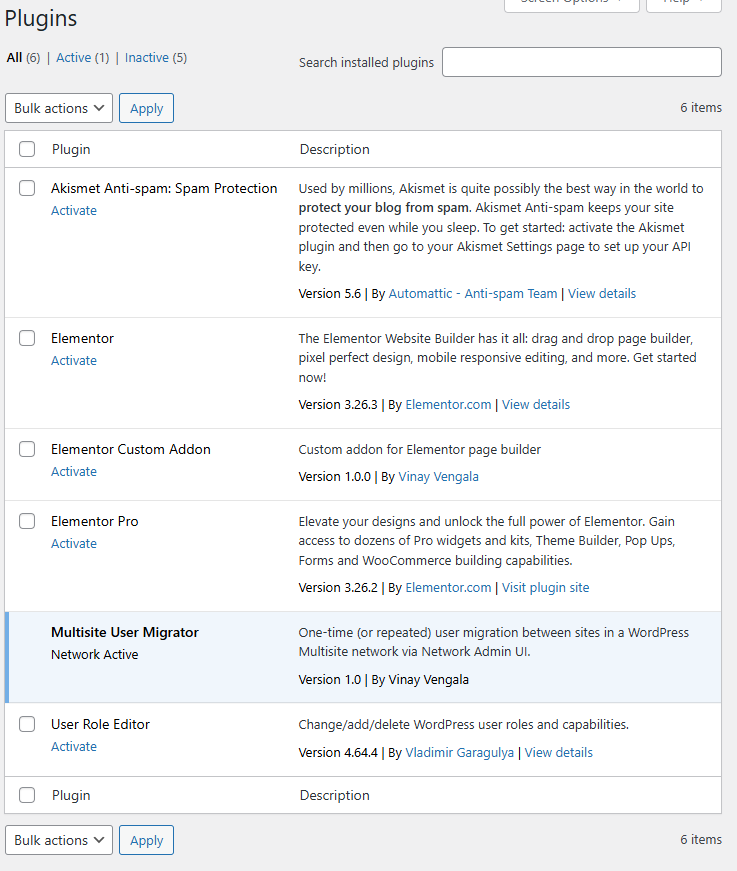
- Network Activate the plugin
- Go to Network Admin → Plugins
- Activate Multisite User Migrator
- Open the tool
- Go to Network Admin → User Migrator (menu on left)
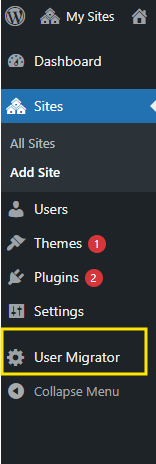
- Go to Network Admin → User Migrator (menu on left)
- Fill in the form:
- From Site ID: source blog ID (where users currently have roles)
- To Site ID: target blog ID (cloned site)
- Fallback Role: e.g.
subscriber(used if no role is found on source)
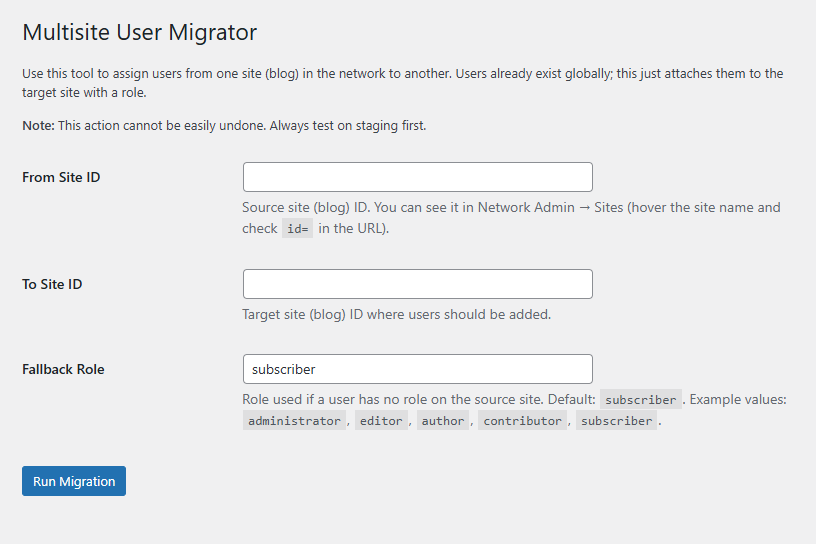
- Click Run Migration
Let us go through this plugin line by line and concept by concept so it is clear what every part is doing and how a user (or another dev) should think about it.
I will keep the explanation grouped by logical blocks instead of literally every single line, so it is understandable.
1. Plugin header and basic safety
<?php
/**
 * Plugin Name: Multisite User Migrator
 * Description: One-time (or repeated) user migration between sites in a WordPress Multisite network via Network Admin UI.
 * Author: Vinay Vengala
 * Version: 1.0
 * Network: true
 */

if ( ! defined( 'ABSPATH' ) ) {
    exit;
}
What this does
/** ... */block: This is the standard WordPress plugin header.Plugin Name: The name shown in the Plugins screen.Description: Short description for admins.Author: Your name or company.Version: Plugin version.Network: true: Marks this plugin as a network plugin (for Multisite). It should be network-activated from Network Admin → Plugins.
if ( ! defined( 'ABSPATH' ) ) exit;:- Security guard.
- Ensures the file is only loaded via WordPress (which defines
ABSPATH). - Prevents direct access via URL (e.g.,
some-domain.com/wp-content/plugins/...).
2. Defining the main class
class MS_User_Migrator {

    public function __construct() {
        // Only load in multisite & for network
        if ( is_multisite() ) {
            add_action( 'network_admin_menu', array( $this, 'add_network_page' ) );
        }
    }
What this does
class MS_User_Migrator { ... }:- Wraps all plugin logic inside a PHP class named
MS_User_Migratorto avoid polluting the global namespace.
- Wraps all plugin logic inside a PHP class named
__construct():- Runs automatically when
new MS_User_Migrator();is called at the bottom of the file. - Checks
is_multisite()to ensure this only runs on a WordPress Multisite install. - Hooks into
network_admin_menu:add_action( 'network_admin_menu', [ $this, 'add_network_page' ] );means:- When WordPress is building the Network Admin menu, call
$this->add_network_page()to add our custom page.
- When WordPress is building the Network Admin menu, call
- Runs automatically when
So: as soon as the plugin is loaded on a multisite, it registers a custom page in Network Admin.
3. Adding the Network Admin menu page
/**
 * Add a page under Network Admin -> Users (or Settings).
 */
public function add_network_page() {
    add_menu_page(
        __( 'User Migrator', 'ms-user-migrator' ),
        __( 'User Migrator', 'ms-user-migrator' ),
        'manage_network_users',
        'ms-user-migrator',
        array( $this, 'render_page' )
    );
}
What this does
add_menu_page()adds a new top-level menu item in Network Admin.
Parameters:
- Page title:
__( 'User Migrator', 'ms-user-migrator' )- Title shown in the browser tab and at the top of the screen.
- Menu title: same as above – “User Migrator”.
- Capability:
'manage_network_users'- Only users with this capability (usually network admins) can see and use this page.
- Menu slug:
'ms-user-migrator'- Used in the URL:
.../wp-admin/network/admin.php?page=ms-user-migrator
- Used in the URL:
- Callback:
array( $this, 'render_page' )- When the page is opened, WordPress calls
$this->render_page()to output the HTML.
- When the page is opened, WordPress calls
So: this is what creates the “User Migrator” item in Network Admin and links it to your form.
4. Rendering the page and handling form submit
/**
 * Render options panel + handle form submission.
 */
public function render_page() {
    if ( ! current_user_can( 'manage_network_users' ) ) {
        wp_die( __( 'You do not have permission to access this page.', 'ms-user-migrator' ) );
    }

    $message = '';
    $error   = '';
Permissions
- First line inside
render_page():- Checks if the current user has the capability
manage_network_users. - If not,
wp_die()stops execution and shows an error. - This is a safety check in addition to the menu capability.
- Checks if the current user has the capability
Variables for feedback
$messageand$error:- Used to store success or error messages for display in the admin UI after form submission.
4.1 Handling form submission
// Handle form submit
if ( isset( $_POST['msum_submit'] ) ) {
    check_admin_referer( 'msum_migrate_users', 'msum_nonce' );

    $from_blog_id  = isset( $_POST['from_blog_id'] ) ? absint( $_POST['from_blog_id'] ) : 0;
    $to_blog_id    = isset( $_POST['to_blog_id'] ) ? absint( $_POST['to_blog_id'] ) : 0;
    $fallback_role = isset( $_POST['fallback_role'] ) ? sanitize_text_field( $_POST['fallback_role'] ) : 'subscriber';
if ( isset( $_POST['msum_submit'] ) ):- Checks if the form was submitted (the submit button named
msum_submitis set).
- Checks if the form was submitted (the submit button named
check_admin_referer( 'msum_migrate_users', 'msum_nonce' ):- Verifies the nonce field for security.
- Ensures the request came from your site and is not CSRF.
- Grabbing form values:
$from_blog_id: Read$_POST['from_blog_id']and convert to integer withabsint(). If not set, use0.$to_blog_id: Same for the target site.$fallback_role: Read and sanitize as plain text. If not set, default to'subscriber'.
4.2 Validating the user input
    if ( ! $from_blog_id || ! $to_blog_id ) {
        $error = 'Both "From Site ID" and "To Site ID" are required.';
    } elseif ( $from_blog_id === $to_blog_id ) {
        $error = 'Source and target site IDs must be different.';
    } else {
        list( $migrated_count, $skipped_count, $err_msg ) = $this->migrate_users( $from_blog_id, $to_blog_id, $fallback_role );

        if ( $err_msg ) {
            $error = $err_msg;
        } else {
            $message = sprintf(
                'Migration complete. Users added to target site: %d. Users already had access and were skipped: %d.',
                $migrated_count,
                $skipped_count
            );
        }
    }
}
- Validation rules:
- If either site ID is empty/zero → set error.
- If both IDs are the same → also error.
- If validation passes:
- Calls
$this->migrate_users( $from_blog_id, $to_blog_id, $fallback_role ). - That method returns an array:
[ $migrated_count, $skipped_count, $err_msg ].
- Calls
- Handling result:
- If
$err_msgis not empty, it is shown as an error. - Otherwise, a success message shows:
- How many users were added to the target site.
- How many were skipped because they already had access.
- If
This is where the actual migration is triggered.
4.3 Keeping the form values after submit
// Get last used values (to keep form filled after submit)
$from_blog_val  = isset( $_POST['from_blog_id'] ) ? absint( $_POST['from_blog_id'] ) : '';
$to_blog_val    = isset( $_POST['to_blog_id'] ) ? absint( $_POST['to_blog_id'] ) : '';
$fallback_val   = isset( $_POST['fallback_role'] ) ? sanitize_text_field( $_POST['fallback_role'] ) : 'subscriber';
These variables are used to pre-fill the form fields:
- If the form was submitted, the values remain in the inputs.
- Good UX: the user does not need to type again if there is an error.
4.4 Outputting the page HTML
    ?>
    <div class="wrap">
        <h1><?php esc_html_e( 'Multisite User Migrator', 'ms-user-migrator' ); ?></h1>

        <p>Use this tool to assign users from one site (blog) in the network to another. Users already exist globally; this just attaches them to the target site with a role.</p>
        <p><strong>Note:</strong> This action cannot be easily undone. Always test on staging first.</p>

        <?php if ( $message ) : ?>
            <div id="message" class="updated notice is-dismissible"><p><?php echo esc_html( $message ); ?></p></div>
        <?php endif; ?>

        <?php if ( $error ) : ?>
            <div class="error notice is-dismissible"><p><?php echo esc_html( $error ); ?></p></div>
        <?php endif; ?>

        <form method="post">
            <?php wp_nonce_field( 'msum_migrate_users', 'msum_nonce' ); ?>

            <table class="form-table" role="presentation">
                <tr>
                    <th scope="row"><label for="from_blog_id">From Site ID</label></th>
                    <td>
                        <input name="from_blog_id" type="number" id="from_blog_id" value="<?php echo esc_attr( $from_blog_val ); ?>" class="regular-text" required />
                        <p class="description">Source site (blog) ID. You can see it in Network Admin → Sites (hover the site name and check <code>id=</code> in the URL).</p>
                    </td>
                </tr>
                <tr>
                    <th scope="row"><label for="to_blog_id">To Site ID</label></th>
                    <td>
                        <input name="to_blog_id" type="number" id="to_blog_id" value="<?php echo esc_attr( $to_blog_val ); ?>" class="regular-text" required />
                        <p class="description">Target site (blog) ID where users should be added.</p>
                    </td>
                </tr>
                <tr>
                    <th scope="row"><label for="fallback_role">Fallback Role</label></th>
                    <td>
                        <input name="fallback_role" type="text" id="fallback_role" value="<?php echo esc_attr( $fallback_val ); ?>" class="regular-text" />
                        <p class="description">Role used if a user has no role on the source site. Default: <code>subscriber</code>. Example values: <code>administrator</code>, <code>editor</code>, <code>author</code>, <code>contributor</code>, <code>subscriber</code>.</p>
                    </td>
                </tr>
            </table>

            <p class="submit">
                <input type="submit" name="msum_submit" id="msum_submit" class="button button-primary" value="Run Migration">
            </p>
        </form>
    </div>
    <?php
}
Key points:
<div class="wrap">and<h1>:- Standard WordPress admin page layout.
- Intro paragraphs:
- Explain to the admin what the tool does.
- Success message:
- Shows in a green
.updated noticebox if$messageis set.
- Shows in a green
- Error message:
- Shows in a red
.error noticebox if$erroris set.
- Shows in a red
<form method="post">:- Uses
POSTto submit.
- Uses
wp_nonce_field( 'msum_migrate_users', 'msum_nonce' );:- Adds a hidden
msum_noncefield for security.
- Adds a hidden
- Form fields:
From Site ID(number input)To Site ID(number input)Fallback Role(text input)
- Submit button:
<input type="submit" name="msum_submit" ... value="Run Migration">- Name
msum_submitis used earlier to detect when the form was submitted.
This entire block is just responsible for the UI and validation feedback.
5. The migration logic
/**
 * Migrate users from one blog to another.
 *
 * @return array [migrated_count, skipped_count, error_message]
 */
protected function migrate_users( $from_blog_id, $to_blog_id, $fallback_role = 'subscriber' ) {
    global $wpdb;

    // Check if both blogs exist
    $from_blog = get_blog_details( $from_blog_id );
    $to_blog   = get_blog_details( $to_blog_id );

    if ( ! $from_blog || ! $to_blog ) {
        return array( 0, 0, 'One or both site IDs do not exist in this network.' );
    }
5.1 Validating blog IDs
- Uses
get_blog_details( $blog_id ):- If either returns
false, that blog does not exist. - In that case the function returns:
- migrated: 0
- skipped: 0
- error message:
'One or both site IDs do not exist in this network.'
- If either returns
5.2 Getting users from the source blog
// Get users from source blog
$user_ids = get_users( array(
    'blog_id' => $from_blog_id,
    'fields'  => 'ID',
) );

if ( empty( $user_ids ) ) {
    return array( 0, 0, 'No users found on the source site.' );
}
get_users()withblog_id:- Gets users that have a role on the source blog.
fields => 'ID'returns only user IDs (not full user objects) to be more efficient.
- If no users found:
- Early return with a friendly message.
5.3 Figuring out meta keys for capabilities
$from_prefix = $wpdb->get_blog_prefix( $from_blog_id );
$to_prefix   = $wpdb->get_blog_prefix( $to_blog_id );

$from_cap_key = $from_prefix . 'capabilities';
$to_cap_key   = $to_prefix . 'capabilities';
- In multisite, each site has its own table prefix, e.g.:
- Main site:
wp_ - Site 2:
wp_2_ - Site 3:
wp_3_etc.
- Main site:
- User roles are stored in user meta under keys like:
wp_capabilitieswp_2_capabilitieswp_3_capabilities
- Here, it builds:
$from_cap_keye.g.wp_2_capabilities$to_cap_keye.g.wp_5_capabilities
These keys are used to get/set user capabilities per site.
5.4 Looping over users and migrating
        $migrated_count = 0;
        $skipped_count  = 0;

        foreach ( $user_ids as $user_id ) {

            // If user already has caps on target blog, skip
            $existing_caps = get_user_meta( $user_id, $to_cap_key, true );
            if ( is_array( $existing_caps ) && ! empty( $existing_caps ) ) {
                $skipped_count++;
                continue;
            }

            // Determine role from source site
            $caps = get_user_meta( $user_id, $from_cap_key, true );
            $role = $fallback_role;

            if ( is_array( $caps ) && ! empty( $caps ) ) {
                $roles = array_keys( $caps );
                if ( ! empty( $roles[0] ) ) {
                    $role = $roles[0];
                }
            }

            // Attach user to target blog
            add_user_to_blog( $to_blog_id, $user_id, $role );
            $migrated_count++;
        }

        return array( $migrated_count, $skipped_count, '' );
    }
}
Step-by-step inside the loop
foreach ( $user_ids as $user_id ):- Loop through each user that has a role on the source site.
- Check if user already has a role on the target blog:
$existing_caps = get_user_meta( $user_id, $to_cap_key, true ); if ( is_array( $existing_caps ) && ! empty( $existing_caps ) ) { $skipped_count++; continue; }- Reads the capabilities for the target site.
- If user already has some caps (already associated with that blog), it:
- Increments
$skipped_count - Uses
continueto skip to the next user.
- Increments
- Get role from source site:
$caps = get_user_meta( $user_id, $from_cap_key, true ); $role = $fallback_role; if ( is_array( $caps ) && ! empty( $caps ) ) { $roles = array_keys( $caps ); if ( ! empty( $roles[0] ) ) { $role = $roles[0]; } }$capsis an array like:array( 'editor' => true )array_keys( $caps )gives an array of roles.- It takes the first role:
$roles[0]. - If nothing found, it uses
$fallback_role(e.g.subscriber).
- Attach user to target blog:
add_user_to_blog( $to_blog_id, $user_id, $role );
$migrated_count++;
Core function that:
- Adds the user to the target blog.
- Assigns them the role determined above.
- At the end:
return array( $migrated_count, $skipped_count, '' );
Returns:
- Number of users migrated
- Number skipped
- Empty error message (success)
6. Bootstrapping the class
new MS_User_Migrator();
- This line creates an instance of the
MS_User_Migratorclass. - Triggers the
__construct()method. - Registers the menu and makes everything work.